A single 16-inch lamp head can light an entire 60-inch desk.
That’s what SUPERDANNY claims for its clamp lamp, and it shows that a lamp’s shape matters as much as its power.
The 7 ergonomic desk lamps below are ranked by how well they keep light off your screen and adjust to your desk:
- Two monitors side by side: #4 spans 42 inches.
- Reading fine print or doing crafts? #7 has a 2.25X glass lens.
- With a free desk edge, #5 clamps on and clears the surface.
Quick Comparison Chart
| # | Product | Our Rating | ||
|---|---|---|---|---|
| 1 |  |
Galnolt 28.2-Inch LED Desk Lamp | ★★★★☆ | Check Price |
| 2 |  |
LEPOWER 800LM LED Desk Lamp | ★★★★☆ | Check Price |
| 3 | 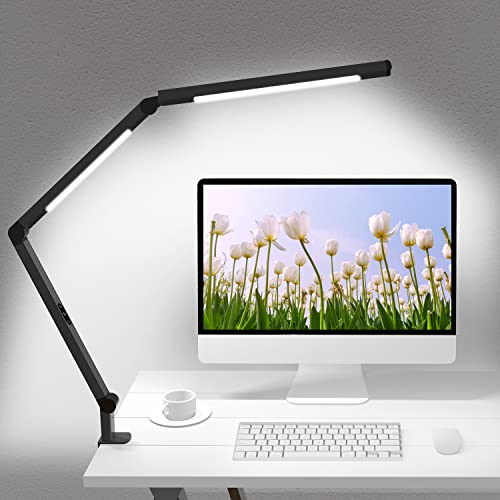 |
Micomlan Dual-Light Clamp Lamp | ★★★★☆ | Check Price |
| 4 |  |
ONEMIX 42-Inch 4-Panel Desk Lamp | ★★★★☆ | Check Price |
| 5 |  |
SUPERDANNY LED Clamp Desk Lamp | ★★★★☆ | Check Price |
| 6 | 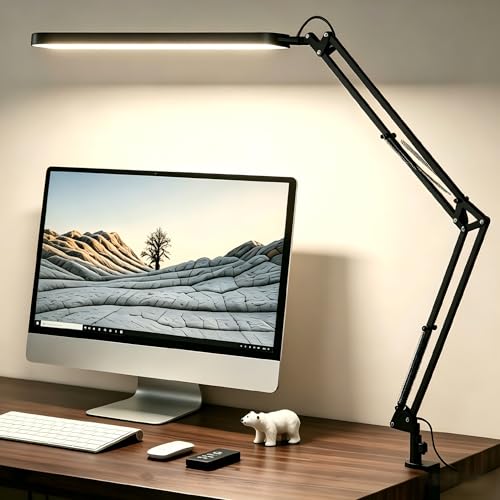 |
SKYLEO Swing Arm Desk Lamp | ★★★★☆ | Check Price |
| 7 |  |
Brightech LightView PRO Magnifying Lamp | ★★★★☆ | Check Price |
The 7 Best Ergonomic Desk Lamps, Ranked
Each lamp was judged on what its maker publishes, not on lab tests. Here’s what counted:
- Glare control: lighting angled off the monitor
- Adjustability: arms and joints that aim light
- Settings: dimming and color temperature range
- Mounting: a clamp or a movable base
1. Galnolt 28.2-Inch LED Desk Lamp
Galnolt 28.2-Inch LED Desk Lamp
A base lamp with 3 light bars angled 45 degrees away from your eyes and screen.
Pros
- Light angled off your monitor
- Dims from 1% to 100%
- 2700K to 6500K range
Cons
- Wide base uses desk space
- No clamp option
The Galnolt is the lamp to get if you sit at a screen all day. Its main bar is angled 45 degrees to aim light away from your eyes and monitor, per the Galnolt listing.
Versus the LEPOWER (#2), you get better glare control and a wider 2700K to 6500K range.
2. LEPOWER 800LM LED Desk Lamp
LEPOWER 800LM LED Desk Lamp
A gooseneck lamp with a wide 800-lumen panel and 50 light settings.
Pros
- 1,400 lux, per the maker
- Fine slide-bar dimming
- Remembers your last setting
Cons
- Base only, no clamp
- No CRI figure listed
The LEPOWER suits readers who want one bright, even panel: 800 lumens and 1,400 lux, per the LEPOWER listing. LEPOWER also claims the RG0 level in IEC 62778 for blue light.
Next to the Galnolt (#1), it’s the simpler gooseneck pick.
3. Micomlan Dual-Light Clamp Lamp
Micomlan Dual-Light Clamp Lamp
A clamp-on architect lamp with 2 heads, CRI 95 and 7 rotating joints.
Pros
- Truest colors on this list
- Aims each head separately
- Metal clamp with silicone pad
Cons
- Clamp tops out at 2.5 inches
- 5 brightness steps, not stepless
The Micomlan fits anyone who needs light in an exact spot, like a keyboard tray. Seven rotating parts and 2 heads let you aim each beam on its own.
Its color rendering index (CRI) of 95, a measure of how true colors look, is the best here. Versus the SUPERDANNY (#5), you trade smooth dimming for a second head.
4. ONEMIX 42-Inch 4-Panel Desk Lamp
ONEMIX 42-Inch 4-Panel Desk Lamp
A 42-inch, 1,800-lumen clamp bar with 4 panels that fold in or swing out.
Pros
- Spans two monitors
- Panels adjust on their own
- 1, 2 and 4-hour timers
Cons
- Too big for small desks
- Warmest setting is 3200K
The ONEMIX is the best desk lamp for dual monitors here: one 42-inch, 1,800-lumen bar spans both screens. A remote with timers makes dimming easy.
Unlike the Galnolt (#1), it clamps on, but its warmest setting is 3200K. For the screens themselves, follow a two-monitor desk setup.
5. SUPERDANNY LED Clamp Desk Lamp
SUPERDANNY LED Clamp Desk Lamp
A clamp-on gooseneck with a 16-inch head, a 60-degree angle and 500 lumens.
Pros
- Frees the desk surface
- Dims from 10% to 100%
- Touch buttons on the head
Cons
- 500 lumens, modest output
- Only 3 color temperatures
The SUPERDANNY suits a small desk, since it clamps on and leaves room for a wrist rest. Its 16-inch head lights at a 60-degree angle, which the maker says keeps light out of your eyes.
Pick it over the Micomlan (#3) for smooth 10% to 100% dimming.
6. SKYLEO Swing Arm Desk Lamp
SKYLEO Swing Arm Desk Lamp
A USB-powered swing-arm lamp with 5 color modes and 11 brightness levels.
Pros
- Runs off a laptop or power bank
- Swing arm and rotating head
- Memory function
Cons
- No lumen or CRI figure
- Arm length not listed
The SKYLEO fits a laptop or student desk, because it runs on USB power. Its Amazon listing pitches it for less eye strain over long hours, with 5 color modes and 11 brightness levels.
Unlike the LEPOWER (#2), its listing gives no lumen or CRI figures.
7. Brightech LightView PRO Magnifying Lamp
Brightech LightView PRO Magnifying Lamp
A clamp-on LED lamp with a 2.25X glass magnifier on a flexible swing arm.
Pros
- Focus 8 inches from the lens
- Real glass resists scratches
- Strong clamp and swing arm
Cons
- No color temperature options listed
- A magnifier first, a lamp second
The Brightech LightView PRO is the best desk lamp here for close work and aging eyes, like small print or sewing. According to the Brightech listing on Amazon, its 2.25X optical lens keeps items in focus 8 inches away.
The same listing says the real glass lens resists scratching and yellowing. For screen work, pick any lamp above it.
What Makes a Desk Lamp Ergonomic?
An ergonomic desk lamp is one you can aim, dim and color-tune so light lands on your work without glare on your screen or in your eyes. Look for an adjustable arm, fine dimming, a color temperature range and angled or diffused light.
How Bright Should a Desk Lamp Be?
A desk lamp for computer work needs a wide dimming range more than a high peak, since you’ll match it to the room through the day. Output on this list runs from 500 lumens on the SUPERDANNY (#5) to 1,800 on the ONEMIX (#4).
Which Color Temperature Is Best for a Desk Lamp?
The best color temperature for a desk lamp is an adjustable one: cooler, whiter light for daytime focus and warmer light at night. Lower kelvin (K) numbers look more yellow, and the Galnolt (#1) spans the widest range here, 2700K to 6500K.
What CRI Should a Desk Lamp Have?
A desk lamp for print, crafts or color work should publish a high CRI, like the Micomlan (#3) at 95 or the Galnolt (#1) at 90+. Several other picks list no CRI at all, so check before you buy.
Clamp or Base Desk Lamp?
A clamp desk lamp is better when space is tight, and a base lamp is better if you move it often or your desk has no usable edge. Measure first: the Micomlan (#3) clamps edges up to 2.5 inches and the ONEMIX (#4) up to 2.75.
Where to Place a Desk Lamp to Avoid Screen Glare
A desk lamp belongs beside your monitor, not in front of or behind it, aimed down at your keyboard or papers. Put it on the side opposite your writing or mouse hand, away from your mouse pad, so your arm casts no shadow.
If the lamp shows up as a reflection on the screen, slide it sideways or tilt the head down.
Room lighting matters too, and the office lighting picks cover overhead options. A lamp is one piece of a comfortable desk, alongside foot rests and other ergonomic desk accessories in a full ergonomic office setup.
Frequently Asked Questions
Do desk lamps help reduce eye strain?
A desk lamp can help reduce eye strain when it lights your desk evenly and keeps glare off your screen and out of your eyes. A lamp you can dim and aim, like the Galnolt (#1), makes that easy.
Are LED desk lamps better for your eyes?
An LED desk lamp is easier on your eyes when it’s dimmable, diffused and aimed away from the screen, and every pick here is LED. LEPOWER also says its lamp (#2) reaches the RG0 level in IEC 62778 for blue light.
Is a monitor light bar better than a desk lamp?
A monitor light bar suits a single screen when you only need light on the keyboard, while a desk lamp is better for paperwork, crafts or two screens. The 42-inch ONEMIX (#4) sits between the two.
Final Thoughts
The Galnolt (#1) is the best ergonomic desk lamp for most computer desks.
On a small desk, clamp on the SUPERDANNY (#5) instead.
This week, measure your desk edge and choose clamp or base before you buy.