One tablet stand was bought 10,000+ times on Amazon in a single month. That’s what the LISEN stand showed on its Amazon listing in November 2026.
A best seller isn’t always the right ergonomic tablet holder for your desk, bed or drawing setup. The LISEN mostly tilts, so your screen stays low instead of rising to eye level.
Here are 7 holders, each for one setup, with height, tilt and fit numbers from its listing. Measure your tablet in its case first, since both screen size and thickness must fit.
Picking the Right Ergonomic Tablet Holder
An ergonomic tablet holder holds your tablet still, closer to eye level, so you stop bending your neck. The 7 picks run from a 7-to-10-inch telescoping stand to a two-foot arm.
That’s ergonomics in a nutshell: fit the gear to your body, not your body to the gear.
So these 7 picks were judged on 4 things, using each maker’s Amazon listing:
- Lift: how far it raises the screen, in inches or by hinge.
- Mount: weighted base, shelf clamp, magnet or bed clamp.
- Fit: screen size, weight and case thickness it accepts.
- Hold: whether joints lock, and what the base does to stop sliding.
Materials feed into hold, too: aluminum and steel bases add weight, while a body made of ABS plastic, a tough molded plastic, keeps a stand light.
Nothing here claims a lab test.
The picks lean on what each listing states, plus how the setups people search for (desk, bed, drawing, travel) line up with each design.
A tablet holder also works best as one piece of your ergonomic desk accessories, next to the keyboard, mouse and chair you already use.
Here’s how the 7 holders compare at a glance:
| # | Product | Our Rating | ||
|---|---|---|---|---|
| 1 |  |
Twelve South HoverBar Duo | ★★★★★ | Check Price |
| 2 |  |
COOPER TabHolder Tablet Stand | ★★★★☆ | Check Price |
| 3 | 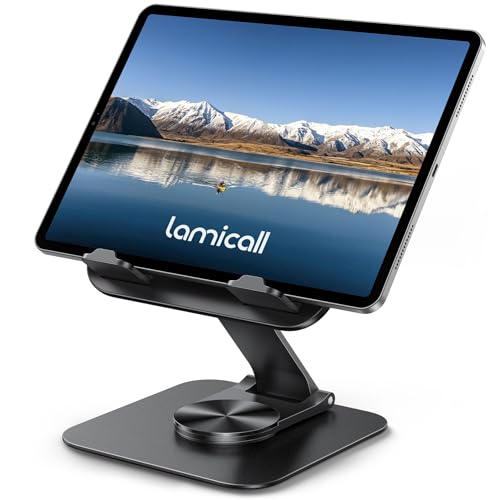 |
Lamicall Adjustable Rotating iPad Stand | ★★★★☆ | Check Price |
| 4 |  |
LULULOOK Magnetic iPad Stand | ★★★★☆ | Check Price |
| 5 |  |
LISEN Foldable iPad Stand | ★★★★☆ | Check Price |
| 6 | 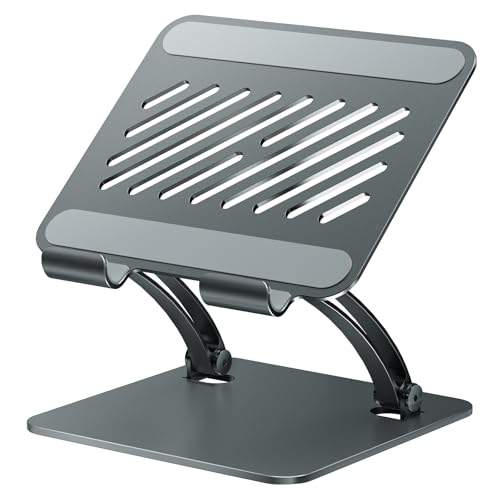 |
tounee Dual Rod Tablet Stand | ★★★★☆ | Check Price |
| 7 | 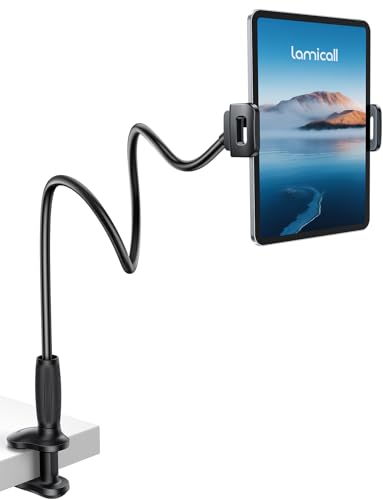 |
Lamicall Gooseneck Tablet Holder for Bed | ★★★★☆ | Check Price |
1. Twelve South HoverBar Duo
Twelve South HoverBar Duo
An articulating iPad arm that comes with both a weighted desk base and a shelf clamp, and lifts the tablet up to two feet off its base.
Pros
- Ships with a weighted base and a shelf clamp
- Raises an iPad up to two feet high
- Quick-release clip swaps mounts in seconds
- Fits all iPad sizes, most with cases on
- Turns an iPad into a keyboard workstation
Cons
- Listing names iPads only, not Android tablets
- Long arm needs more room than a folding stand
The Twelve South HoverBar Duo is the best pick if your iPad lives at a desk for hours, because it’s the only holder here that ships with both a weighted base and a shelf clamp.
It suits iPad owners who want the screen high, beside a monitor or over a keyboard. Skip it if you use an Android tablet, since the listing names iPads only.
Why does that matter?
The listing says the arm holds an iPad up to two feet in the air, or all the way down to the base.
That range covers sitting, leaning back and video calls without stacking books under anything.
Then the quick-release clip lets you move the iPad from the desk base to the shelf clamp in seconds.
So it can sit on your desk during the day and clamp to a kitchen shelf for recipes at night.
Here’s a setup that works:
- Put the weighted base beside your main monitor.
- Raise the arm until the iPad sits level with the monitor screen.
- Pair a keyboard and a trackpad or mouse so your hands stay low while your eyes stay up.
Twelve South pitches it for hands-free calls and Mac Sidecar, and it fits neatly into a dual monitor desk setup as a small third screen.
In other words, if you want a desk holder you never outgrow, start here.
2. COOPER TabHolder Tablet Stand
COOPER TabHolder Tablet Stand
A telescoping tablet stand that rises from 7 to 10 inches, tilts 270 degrees and holds devices up to 4.4 lb on a weighted metal base.
Pros
- Telescopes 7 to 10 inches toward eye level
- Weighted metal base with EVA non-slip pad
- Holds tablets and 15.6-17 inch monitors
- 40% wider plate with triple silicone padding
- Rod tested over 10,000 adjustments
Cons
- No 360° swivel base listed
- Does not fold flat like travel stands
The COOPER TabHolder is the best stand for raising any brand of tablet, because its rod telescopes from 7 to 10 inches and holds up to 4.4 lb.
It fits Samsung Galaxy Tab, Kindle and iPad owners, plus anyone with a 15.6 to 17 inch portable monitor.
Skip it if you need to swivel the screen toward someone across the table.
The catch?
A fold-flat stand like the LISEN (#5) mostly tilts, so your screen stays close to the desk.
The TabHolder adds height, and COOPER says the 7 to 10 inch range brings screens to eye level.
It also tilts 270 degrees, which covers typing, calls and reading.
Stability comes from 3 parts working together:
- A weighted metal base that resists tipping on soft surfaces.
- EVA non-slip padding under the base.
- A holding plate billed as 40% wider, with triple silicone padding.
COOPER adds cooling vents for airflow, and says the friction rod was tested more than 10,000 times.
Compared with the HoverBar Duo (#1), it won’t reach as high, but it holds non-Apple tablets and heavier monitors without a clamp.
Key Takeaway: If your tablet isn’t an iPad, this is the holder to beat.
3. Lamicall Adjustable Rotating iPad Stand
Lamicall Adjustable Rotating iPad Stand
A two-hinge desk stand on a 360° rotating metal base that fits 4.7-13 inch devices with cases up to 0.75 inch and folds to 0.59 inch.
Pros
- Base turns 360° to share your screen
- Two hinges set height and tilt
- Included wrench sets hinge tightness
- Fits 4.7-13 inch devices in their cases
- Folds 0.59 inch thin for a bag
Cons
- Needs firm force to unfold the first time
- Tops out at 13 inch devices
The Lamicall Adjustable Rotating iPad Stand is the best pick for sharing a screen, because its metal base gives you full 360° rotation while the tablet stays put.
It’s made for people who show a tablet to clients, students or a partner across the desk. Skip it if your tablet is larger than 13 inches.
Say you run a weekly meeting from your screen.
You pull up a chart, spin the base toward the person across from you, then spin it back.
No lifting, no re-angling.
Two hinges handle height and tilt on an alloy steel connecting rod, and a wrench comes in the box so you can set how tight each hinge feels.
The stand fits 4.7 to 13 inch devices, from an iPad Mini or Kindle Fire up to a 12.9 inch iPad Pro, and its widened hooks take cases up to 0.75 inch thick.
Folded, it’s 0.59 inch thin, so it slides into a laptop sleeve.
Note: the hinges are stiff enough that you’ll need firm force to unfold it the first time.
So if you want a rotating desk stand that also travels, this one does both.
4. LULULOOK Magnetic iPad Stand
LULULOOK Magnetic iPad Stand
A foldable aluminum magnetic stand for iPad Air 11 and iPad Pro 11 models, with a 360° rotating base and two hinges for height and angle.
Pros
- iPad snaps on with no clips
- Lower hinge sets height, upper sets angle
- Base rotates 360° for sharing
- Camera cutout keeps the lens clear
- Folds fully for a backpack
Cons
- Fits only the iPad models it lists
- Case must come off for the best hold
The LULULOOK Magnetic iPad Stand is the best pick for an iPad Air 11 or iPad Pro 11 owner who wants to snap the screen on and off with no clips at all.
It’s built for iPad Air 11 (M2, M3, M4) and iPad Pro 11 (1st to 4th gen) owners who dock and undock often.
Skip it if your iPad isn’t on its list, because the magnets only line up with those models.
The lower hinge sets the height and the upper hinge sets the angle on its aluminum alloy frame, so you can raise the iPad to eye level and then tilt it for notes or drawing.
The base offers 360° rotation, and a square cutout keeps the camera clear for video calls.
Here’s the trade-off:
LULULOOK says to remove your case for the best magnetic hold.
That means a little extra handling every time, and a stand bought for one iPad may not fit the next one you buy.
Compared with the Lamicall (#3), you give up universal fit for a cleaner, clip-free mount.
5. LISEN Foldable iPad Stand
LISEN Foldable iPad Stand
A gravity-hold folding stand that tilts 0-135°, fits 4-15.6 inch devices up to 0.7 inch thick and keeps the charging port open.
Pros
- Takes cased tablets up to 0.7 inch thick
- Tilts from flat to near vertical
- Charging port stays clear either way up
- Bridge screw re-tightens the hinge
- Weighted base with silicone pads
Cons
- No 360° swivel base
- Phones fit in landscape only
The LISEN Foldable iPad Stand is the best pick for a tablet in a thick case, because its widened hook takes devices up to 0.7 inch thick without undressing them.
It suits families and kitchens where the tablet lives in a rugged case. Skip it if you need real height, since it’s built to tilt, not to rise like #2.
It’s also the most popular stand here.
Amazon ranked it #2 in Tablet Stands in its Best Sellers Rank as of November 2026.
The design is simple: gravity holds the tablet against a back-tilted cradle, with no clamps or magnets.
Its tilt range runs from 0 to 135 degrees, from flat for reading to near vertical for typing.
That range is the main reason it works for so many setups.
Here’s a quick checklist before you buy:
- Measure your tablet in its case: it needs to be 0.7 inch thick or less.
- Check the screen: it fits 4 to 15.6 inch devices, from smartphones, a Kindle and an iPad Mini to a 13 inch iPad Pro.
- An iPhone or other phone works too, but only in landscape.
At 15.2 ounces, it has enough weight to stay planted without being a pain to move.
That’s easy cable management, too: the charging port stays open in portrait and landscape, so you can plug in mid-call.
6. tounee Dual Rod Tablet Stand
tounee Dual Rod Tablet Stand
A dual-rod aluminum stand with locking joints and an all-metal weighted base, sized for 4.7-16.9 inch tablets and portable monitors.
Pros
- Holds 4.7-16.9 inch tablets and monitors
- Two rods steady larger screens
- Locking joints hold height and angle
- Silicone pads on base and holder
- Folds flat for storage
Cons
- Not designed for laptops
- No rotating base listed
The tounee Dual Rod Tablet Stand is the best pick for big screens, because it holds 4.7 to 16.9 inch tablets and portable monitors on two support rods instead of one.
It’s the one for 13 inch iPad Pro, Surface and portable monitor owners. Skip it if you hoped to prop a laptop on it, since tounee says it isn’t designed for laptops.
Why two rods?
A single rod carries the whole screen on one joint.
Two rods share that load, and a locking mechanism holds the height and angle you set.
That gives you a low position for typing and a higher one for video calls.
The base is all metal and weighted, with silicone pads on both the base and the device holder.
So the tablet doesn’t slide, and your desk doesn’t get scratched.
It also folds flat, which makes it a solid travel stand for anyone carrying a portable monitor.
In short, pick it over #2 when your screen is bigger than the COOPER plate likes.
7. Lamicall Gooseneck Tablet Holder for Bed
Lamicall Gooseneck Tablet Holder for Bed
A tapered aluminum gooseneck that clamps to a headboard, desk or table 0.2-3.15 inches thick and holds 4.7-13 inch devices up to 800 g.
Pros
- Clamps to headboards, desks and tables
- Bends to hold the screen over your pillow
- Clamp turns for portrait or landscape
- TPE pads protect device and furniture
- Wide clamp base cuts shaking
Cons
- Slight wobble when you tap the screen
- Arm takes two hands and some force to bend
The Lamicall Gooseneck Tablet Holder for Bed is the best pick for reading lying down, because it clamps to a headboard or nightstand and bends the screen over your pillow.
It’s made for readers and late-night streamers who are tired of holding a tablet above their face.
Skip it if you tap the screen constantly, since the listing admits to slight wobble.
The clamp fits flat surfaces 0.2 to 3.15 inches thick.
That covers most headboards, desk edges and side tables.
From there, the tapered aluminum arm holds 4.7 to 13 inch devices up to 800 g, from a Kindle to a Nintendo Switch, and the clamp rotates for portrait or landscape.
Here’s how to set it up so it stays steady:
- Clamp it to the sturdiest surface near you, not a thin shelf.
- Bend the arm into an S, Z or loop shape.
- Insert the tablet long edge first into the clamp.
- Steady the tablet with one hand when you type or tap a lot.
Lamicall says the wider clamp base reduces shaking compared with standard holders.
Key Takeaway: For reading in bed, a clamp arm beats any desk stand, as long as you mostly swipe instead of type.
How High Should a Tablet Holder Put Your Screen?
A tablet holder should raise the screen until you look straight ahead at it, instead of bending your neck down toward your lap.
The 7 to 10 inch rod on the COOPER TabHolder is designed to bring screens to eye level, and the Lamicall gooseneck is designed to adjust to eye level to relieve neck strain.
So how do you hit that?
Sit the way you normally work, then raise the holder until your line of sight meets the top of the screen with your chin level.
If you type, keep the tablet up and move the typing down to an external keyboard.
Otherwise you end up raising your arms to reach the glass.
The same rule works standing up: at a standing desk, the HoverBar Duo arm (#1) has the reach to match the higher eye line.
Glare matters too.
Tilt the screen back a little, and light it from the side with an ergonomic desk lamp instead of from behind you.
Your back and shoulders matter as much as the screen, so set a good ergonomic reading position in your chair before you fine-tune the holder.
Stand or Clamp Arm: Which Tablet Holder Fits Your Space?
A weighted stand is the better tablet holder if you tap, type or draw on the screen, and a clamp arm is better if you want the screen high, over a bed or off a crowded desk.
Here’s the difference in practice:
A stand sits on its own base, so it’s steady and easy to move.
But it takes desk space, and most only reach as high as their rod, like the 7 to 10 inches on the COOPER (#2).
A clamp arm grips an edge, so it frees the surface and reaches farther.
The trade-off is wobble, a known weak spot of the gooseneck at #7.
Can’t decide? The HoverBar Duo (#1) comes with both mounts, so you can try each.
If your forearm gets tired from reaching up to a raised screen, an ergonomic arm support takes that load off your shoulder.
And when the tablet becomes a real workstation, a keyboard and mouse from the right ergonomic computer accessories keep your hands low.
Will Your Tablet and Case Fit the Holder?
A tablet holder fits your tablet when both the screen size and the thickness with the case on fall inside its listed range, so measure the cased tablet before you buy.
Screen ranges on this list run from 4 to 15.6 inches on the LISEN (#5) up to 16.9 inches on the tounee (#6).
Case depth is where people get caught out.
The LISEN fits devices up to 0.7 inch thick, and the Lamicall rotating stand (#3) takes cases up to 0.75 inch.
Magnetic stands work the other way.
The LULULOOK (#4) fits only the iPad models it names, and it wants the case off.
Pro Tip: Lay a ruler across the thickest part of your cased tablet, usually the camera bump or a folio flap, and compare that number to the listing.
So a 2-minute measurement now saves a return later.
How to Stop a Tablet Holder From Wobbling
A tablet holder stops wobbling when you lower its angle, tighten its joints and put it on a firm, level surface.
The LISEN listing puts it simply: set the stand to its lowest angle for maximum stability when you tap, type or draw.
Here’s the order to try:
- Drop the tilt angle first, since a lower angle puts more of the tablet’s weight on the base.
- Tighten the hinges, using the wrench Lamicall includes (#3) or the bridge screw LISEN includes (#5).
- Move the stand off soft surfaces, or onto a desk mat if it slides.
- On a clamp arm, bend it into an S or loop shape and steady the screen with one hand while typing.
If it still moves, the holder may simply be the wrong type.
A gooseneck will never feel as solid as a weighted stand, so swap it for #2 or #6 if you type a lot.
A steady holder is one fix; other ergonomic devices handle wrists, feet and lighting, and a full ergonomic office setup ties them together.
Frequently Asked Questions
Is there an iPad stand that provides neck support?
Yes, an adjustable iPad stand such as the Twelve South HoverBar Duo supports your neck by lifting the iPad up to two feet, so you look ahead instead of down at your lap.
For any tablet brand, the COOPER TabHolder raises the screen 7 to 10 inches on a weighted base.
What is the best iPad holder for bed reading?
The Lamicall Gooseneck Tablet Holder for Bed is the best iPad holder for bed reading, because it clamps to headboards and nightstands 0.2 to 3.15 inches thick and bends the screen over your pillow.
Bend the arm into an S shape for the steadiest hold.
What is the best adjustable tablet stand for a desk?
The COOPER TabHolder is the best adjustable tablet stand for a desk with any tablet brand, with a 7 to 10 inch telescoping rod and 270 degree tilt.
If you use an iPad and want more height, the Twelve South HoverBar Duo arm reaches up to two feet.
Are magnetic iPad stands safe for your iPad?
A magnetic iPad stand such as the LULULOOK holds an iPad securely when it matches your exact model, and its silicone contact points protect the back of the tablet.
LULULOOK says to take the case off for the strongest hold, so check its model list before you buy.
What is the best tablet floor stand for a bed or sofa?
A gooseneck floor stand is the best option for a bed or sofa when there is nothing to clamp to, such as the Lamicall Tablet Floor Stand with a 63 inch adjustable height and a 10.6 lb base.
If you have a headboard, the clamp-on Lamicall Gooseneck Tablet Holder for Bed takes up less floor space.
What kind of tablet stand is best for drawing on an iPad?
A low, rigid stand with a locking angle is best for drawing on an iPad, such as the LULULOOK Magnetic iPad Stand, whose upper hinge sets the angle for painting and notes.
Skip gooseneck arms for drawing, because they flex when you press the pencil.
Can a tablet stand rotate between portrait and landscape?
Yes, a tablet stand with 360° rotation in its base, such as the Lamicall Adjustable Rotating iPad Stand, turns between portrait and landscape without taking the tablet out.
Fixed stands like the LISEN still hold either orientation, but you lift the tablet to switch.
How long does an ergonomic tablet stand last?
An ergonomic tablet stand lasts longest when its joints can be re-tightened, such as the LISEN with its included bridge screw or the Lamicall with its hinge wrench.
The rod on the COOPER TabHolder is billed as tested over 10,000 adjustments.
Is an ergonomic tablet holder worth it?
An ergonomic tablet holder is worth it if you use a tablet for long stretches, because it keeps the screen up so you stop bending your neck toward your lap.
Start with the spot you use your tablet most, desk, bed or drawing table, and pick the holder built for it.
Final Thoughts
Height is the biggest win from any tablet holder: get the screen up and keep your hands low.
For most iPad desks that means the Twelve South HoverBar Duo, and for every other tablet the COOPER TabHolder.
This week, measure your tablet in its case, note where you use it most, then pick the one holder on this list built for that spot.