
Every time you reach for a separate mouse, your shoulder and wrist pay a small price that adds up fast over a full workday.
Touchpad keyboards eliminate that reach entirely by putting cursor control right where your hands already are.
We tested 10 touchpad keyboards from Adesso, Perixx, and Logitech, including wireless options and foldable travel models, to find which ones are actually worth it.
Quick Comparison Chart
| # | Product | Our Rating | ||
|---|---|---|---|---|
| 1 |  |
Adesso PCK-308UB - Tru-Form Pro Ergonomic Contour TouchPad USB Keyboard Black with Hotkeys | ★★★★★ | Check Price |
| 2 | 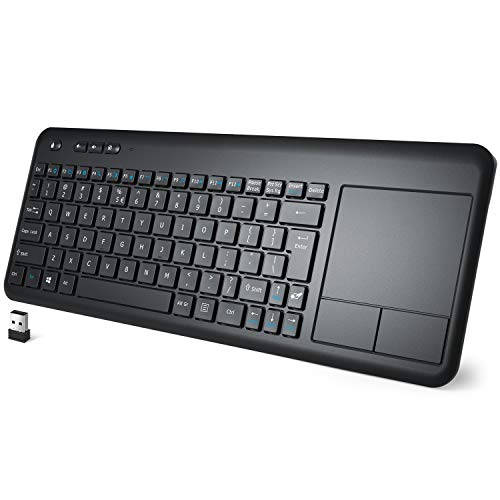 |
Wireless Keyboard with Touchpad, WisFox 2.4G Slim Ergonomic Wireless Keyboard | ★★★★★ | Check Price |
| 3 |  |
Adesso AKB-450UB - Ergonomic Keyboard with Built-in Touchpad | ★★★★☆ | Check Price |
| 4 |  |
Perixx Periboard-507 Wired Ergonomic Split Keyboard with Touchpad Full Size Layout 11348 Black | ★★★★☆ | Check Price |
| 5 |  |
Adesso WKB-4500UB - Wireless Ergonomic Desktop Touchpad Keyboard | ★★★★☆ | Check Price |
| 6 |  |
Wireless Keyboard, TedGem 2.4G Wireless Keyboard with Touchpad Keyboard | ★★★★☆ | Check Price |
| 7 | |
BTC 8140M 109-Key PS/2 & Serial Natural Ergonomic Keyboard w/Touchpad (Beige) | ★★★★☆ | Check Price |
| 8 |  |
Logitech K830 Illuminated Living-Room Keyboard with Built-in Touchpad | ★★★★☆ | Check Price |
| 9 | 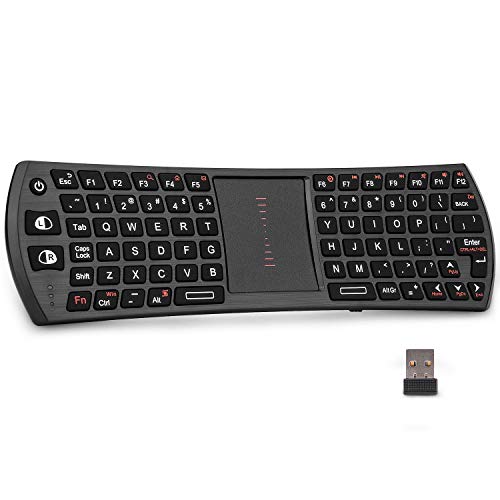 |
Rii Mini 2.4G Wireless Keyboard Touchpad Combo K24T Mini Keyboard | ★★★★☆ | Check Price |
| 10 |  |
Samsers Multi - Device Foldable Bluetooth Keyboard with Touchpad Rechargeable Dual | ★★★★☆ | Check Price |
1. Adesso PCK-308UB - Tru-Form Pro Ergonomic Contour TouchPad USB Keyboard Black with Hotkeys — Best Overall
Adesso PCK-308UB - Tru-Form Pro Ergonomic Contour TouchPad USB Keyboard Black with Hotkeys
Looking for a keyboard with a comfortable keyboard layout and a touchpad that is cost-efficient and stylish at the same time? Here's one of the best you will ever find!
Pros
- These keyboards have a wavy curved design and make it ergonomic and comfortable to use
- It has a protruding touch-pad that offers great comfort while switching from keys to the touchpad
- It has a sleek design, is very lightweight and easy to use
- It comes with a USB port making it compatible with a huge variety of devices and media
Cons
- Wired USB only, no wireless option
- Full-size layout takes up a lot of desk space
Looking for a keyboard with a comfortable keyboard layout and a touchpad that is cost-efficient and stylish at the same time? Here’s one of the best you will ever find!
This Tru-Form Pro Ergonomic keyboard by Adesso has a total of 105 keys including an extended keyboard layout with 8 hotkeys that steps up that typing game without affecting the comfort of your hands. If you want to learn more about why these layouts help, read about ergonomic keyboard benefits.
This keyboard comes with a USB slot giving you the freedom of using it with various devices and for many purposes.
2. Wireless Keyboard with Touchpad, WisFox 2.4G Slim Ergonomic Wireless Keyboard — Runner Up
Wireless Keyboard with Touchpad, WisFox 2.4G Slim Ergonomic Wireless Keyboard
This keyboard is the best match for people who are searching for a wireless, ergonomic keyboard that has an in-built touchpad in it. This wireless touchpad keyboard has a familiar keyboard layout tha
Pros
- These are wireless so it makes it very easy to work on it from any distance
- These have a thin, sleek built and are very easy to carry around
- They have a sleep mode, that helps save the battery
- They have a built-in touchpad that helps in easy navigation
Cons
- Touchpad is small and can feel cramped
- 2.4GHz only, no Bluetooth
This keyboard is the best match for people who are searching for a wireless, ergonomic keyboard that has an in-built touchpad in it. This wireless touchpad keyboard has a familiar keyboard layout that comes with a touchpad and a built-in multi-touch navigation trackpad.
The touchpad can easily instead of the mouse to control the directions for web browsing and gaming. If you prefer a trackball over a touchpad, see our ergonomic keyboards with trackball roundup.
This stunning keyboard connects to your device wirelessly with a unique nano receiver and controls the media anywhere within the distance of 10 meters, creating an uninterrupted connection for your device.
3. Adesso AKB-450UB - Ergonomic Keyboard with Built-in Touchpad — Best Value
Adesso AKB-450UB - Ergonomic Keyboard with Built-in Touchpad
This keyboard is one of the best selling ergonomic keyboards by Adesso. This stunning keyboard has an ergonomic contour design that minimizes strain and prevents forearm muscles from twisting and pai
Pros
- This keyboard has a unique wavy curved design and makes it ergonomic and comfortable to use
- It also includes protruding touch-pad that offers excellent comfort while switching from keys to the touchpad
- It has a sleek design, is very lightweight and easy to use
- It comes with a USB port making it compatible with a huge variety of devices and media
Cons
- Takes time to adjust to
- Bulkier than alternatives
This keyboard is one of the best selling ergonomic keyboards by Adesso. This stunning keyboard has an ergonomic contour design that minimizes strain and prevents forearm muscles from twisting and pains from Carpal Tunnel Syndrome.
This keyboard by Adesso features a built-in glide point integrated touchpad which will act as a replacement for your mouse, making it easier to control the movement of the cursor of your personal computer and enable easy navigation. It has a unique split key design that encourages the natural position of hands, wrists, and forearms for maximum comfort and adds the ergonomic detail to the keyboard.
4. Perixx Periboard-507 Wired Ergonomic Split Keyboard with Touchpad Full Size Layout 11348 Black — Top Pick
Perixx Periboard-507 Wired Ergonomic Split Keyboard with Touchpad Full Size Layout 11348 Black
For ergonomic keyboards, a split-key design is hard to beat. This ergonomic keyboard by Perixx Periboard has a unique split key design, that makes sure that your arm
Pros
- These keyboards have a wavy curved design and make it ergonomic and comfortable to use
- It has a smart touch-pad that offers great comfort while switching from keys to the touchpad
- It has a stylish sleek design, is very lightweight and easy to use
- It comes with a USB port making it compatible with a huge variety of devices and media
Cons
- Wired only, less portable
- Touchpad placement below spacebar feels awkward
For ergonomic keyboards, a split-key design is hard to beat. This ergonomic keyboard by Perixx Periboard has a unique split key design, that makes sure that your arms and hands are positioned naturally reducing strain on them, while their integrated palm rest design supports your wrists provides a comfortable position.
It has a built-in touchpad positioned inwards in the lower part of the keyboard. The build-in touchpad comes with pointing and scrolling feature that is added with or without the tap-to-click feature.
5. Adesso WKB-4500UB - Wireless Ergonomic Desktop Touchpad Keyboard — Top Pick
Adesso WKB-4500UB - Wireless Ergonomic Desktop Touchpad Keyboard
Here's yet another amazing ergonomic keyboard by Adesso that is wireless and has a unique touchpad that makes it one of the best keyboards in the market! This stunning keyboard by Adesso has a wirele
Pros
- It's a wireless keyboard that can easily be used with various devices and from a good distance
- These keyboards have a wavy curved design and make it ergonomic and comfortable to use
- It has a unique touch-pad that offers great comfort while switching from keys to the touchpad
- It has a sleek design, is very lightweight, and easy to use
Cons
- Touchpad is basic compared to standalone options
- 2.4GHz wireless range is limited
It has quite wide buttons and a large touchpad that makes navigation very easy.
It has an automatic sleep option that saves battery, simply click any button to activate it.
The wireless keyboard enters a light sleep state, after 20 seconds of no operation, and if it’s not used for another 15 minutes, it will automatically enter the deep sleep mode, you just have to click any button to activate it again.
Here’s yet another amazing ergonomic keyboard by Adesso that is wireless and has a unique touchpad that makes it one of the best keyboards in the market! This stunning keyboard by Adesso has a wireless technology that easily works up to 30 feet of wireless distance and operates on 12 different channels, each with 65,536 different IDs!
Amazing right? It has a unique built-in glide-point touchpad that means this keyboard features an integrated touchpad that can replace your mouse, making it easier to control the movement of the cursor of your personal computer or any other device that you might be using.
If you still prefer a standalone ergonomic touchpad, those are worth considering too.
6. Wireless Keyboard, TedGem 2.4G Wireless Keyboard with Touchpad Keyboard — Worth Considering
Wireless Keyboard, TedGem 2.4G Wireless Keyboard with Touchpad Keyboard
Looking a good wireless ergonomic keyboard within that is pocket friendly as well? Here is the best match for you!
Pros
- These keyboards have an ergonomic design and make it comfortable to use
- It's sleek, stylish and lightweight
- It's wireless and easy to use from a distance
- It has a touch-pad that offers great comfort while switching from keys to the touchpad
Cons
- No ergonomic split or curve in the layout
- Touchpad sensitivity isn't adjustable
This stunning keyboard connects to your device wirelessly with a unique nano receiver and controls the media anywhere within the distance of 10 meters, creating an uninterrupted connection for your device.
It’s simply a plug and plays a keyboard that provides anti-jamming Stable transmission.
This wireless keyboard comes with 89 keys and a pre-built touchpad, with 12 multimedia shortcuts and 5 media hotkeys, it’s completely functional, compact, ultra-thin, sleek, saves space and is convenient to carry around.
Looking a good wireless ergonomic keyboard within that is pocket friendly as well? Here is the best match for you!
You are really gonna love this wireless ergonomic keyboard by Tedgem. This is an all in one keyboard so bid farewell to the mouse!
7. BTC 8140M 109-Key PS/2 & Serial Natural Ergonomic Keyboard w/Touchpad (Beige) — Worth Considering
BTC 8140M 109-Key PS/2 & Serial Natural Ergonomic Keyboard w/Touchpad (Beige)
Looking for a classic keyboard with a comfortable keyboard layout, and a touchpad that is cost-efficient and easy to use at the same time? Here's one of the best you will ever find!
Pros
- These keyboards have a classic natural finish to it
- It has a touchpad that helps in easy navigation and replaces the mouse
- It comes with a USB port making it compatible with a huge variety of devices and media
Cons
- PS/2 connector, won't work with most modern PCs
- Beige color looks outdated
This keyboard is the best match for people who are searching for a wireless, ergonomic keyboard that has an in-built touchpad in it.
This wireless touchpad keyboard has a familiar keyboard layout that comes with a touchpad and a built-in multi-touch navigation trackpad.
The touchpad can easily instead of the mouse to control the directions for web browsing and gaming.
Looking for a classic keyboard with a comfortable keyboard layout, and a touchpad that is cost-efficient and easy to use at the same time? Here’s one of the best you will ever find!
This amazing Ergonomic keyboard by BTC has a total of 109 keys, including an extended keyboard layout with 8 hotkeys that steps up that typing game without affecting the comfort of your hands. This keyboard comes with a USB slot giving you the freedom of using it with various devices and for many purposes.
8. Logitech K830 Illuminated Living-Room Keyboard with Built-in Touchpad — Worth Considering
Logitech K830 Illuminated Living-Room Keyboard with Built-in Touchpad
Looking for a stylish keyboard with a comfortable keyboard layout and a touchpad that is cost-efficient and ergonomic to use? Here's one of the best you will ever find!
Pros
- These keyboards have an illumination effect so its easy to work in all sorts of light conditions
- It has a touch-pad that offers great comfort while switching from keys to the touchpad
- It has a sleek design, is very lightweight and easy to use
- It comes with a USB port making it compatible with a huge variety of devices and media
Cons
- Takes time to adjust to
- Bulkier than alternatives
It also includes an in-built touchpad with both left/right buttons for easy surfing and multimedia as well as Windows hotkeys.
It has a sleek matte black body made out of sturdy plastic material that has wave-like curves along the mid part of the keyboard to make sure the keys are arranged in a way that is comfortable and more accessible to the user.
There is white dug-in typography on the plastic keys and a protruding touchpad in dark metal grey color.
Looking for a stylish keyboard with a comfortable keyboard layout and a touchpad that is cost-efficient and ergonomic to use? Here’s one of the best you will ever find!
This Ergonomic keyboard by Logitech, ensures easy typing, even in the dark, enabling you to type effortlessly in all lighting conditions, as it has a sensor that detects the amount of light in the room and automatically dims or brightens the backlight to suit your needs. This K830 streamlines navigation in the living room by combining these two devices into one, a keyboard, and a mouse!
9. Rii Mini 2.4G Wireless Keyboard Touchpad Combo K24T Mini Keyboard — Worth Considering
Rii Mini 2.4G Wireless Keyboard Touchpad Combo K24T Mini Keyboard
One of the best and most stylish ergonomic keyboards of all time! This keyboard is an all in one device with a keyboard and a mouse at the same time, Rii mini 2.
Pros
- These keyboards are ergonomic and easy to use
- It comes with a touchpad that offers great comfort while switching from keys to the touchpad
- It has a sleek design, is very lightweight and easy to use
Cons
- Mini size makes extended typing uncomfortable
- Touchpad is tiny and imprecise
This keyboard comes with a USB slot giving you the freedom of using it with various devices and for many purposes.
It does come with a power key namely the windows power key and indications such as num lock, caps lock, and scroll lock.
This keyboard by Adesso owns a very ideal key size, of the dimensions, 19.25L x 10.75W x 2H inches, making it a comfortable and ergonomic keyboard to use.
One of the best and most stylish ergonomic keyboards of all time! This keyboard is an all in one device with a keyboard and a mouse at the same time, Rii mini 2.4G wireless keyboard and mouse, it’s compatible with HTPC, Smart TV, TV BOX running Android systems.
It has a smart touchpad, this touchpad is activated together with the keyboard when the keyboard is on, the keyboard is ready for use, this way you will enjoy more convenience and control on-screen menu easier.
10. Samsers Multi - Device Foldable Bluetooth Keyboard with Touchpad Rechargeable Dual — Worth Considering
Samsers Multi - Device Foldable Bluetooth Keyboard with Touchpad Rechargeable Dual
【Dual-Mode Foldable Wireless Keyboard】Samsers multi-device Bluetooth keyboard supports 3 devices connection simultaneously, seamless switching without delay (2.4G wireless + Bluetooth 1 + Bluetooth 2)
Pros
- 【Dual-Mode Foldable Wireless Keyboard】Samsers multi-device Bluetooth keyboard...
- 【Folding Bluetooth Keyboard & Phone Stand Holder】Extremely thin design of the...
- 【Sensitive Touchpad Foldable Keyboard】Upgrade sensitive touchpad supports mou...
Cons
- Foldable hinge feels fragile over time
- Touchpad is too small for serious navigation
【Dual-Mode Foldable Wireless Keyboard】Samsers multi-device Bluetooth keyboard supports 3 devices connection simultaneously, seamless switching without delay (2.4G wireless + Bluetooth 1 + Bluetooth 2). The attached 2.4G receiver allows laptops or desktops without Bluetooth function to connect and use worry-free!
You can type, switch, and continue typing!
【Folding Bluetooth Keyboard & Phone Stand Holder】Extremely thin design of the portable folding keyboard allows you to fold it up and put it in your pocket or bag without taking up too much space. The Phone stand holder, best companion for folding keyboard, gives you perfect screen angle.
Near-standard size design provides accurate, fast typing, just like the desktop keyboard you are used to. Quiet keys also allow you to focus on your work.
Perfect gift for travel and business trips! 【Sensitive Touchpad Foldable Keyboard】Upgrade sensitive touchpad supports mouse left and right key function, so you can control the device without using mouse. Updated richer and more practical multimedia shortcut functions make your work more convenient and more efficient!
Built-in rechargeable battery can last for 48 hours or 560 hours after 2-3 hours of charging. One full charge last enough for your short business trip or vacation!
Buying Guide
A keyboard with a built-in touchpad is a very specific type of product. Here’s what determines whether you’ll love it or return it.
Touchpad Size and Responsiveness
The touchpad is the whole point, and a tiny, unresponsive one defeats the purpose. The Adesso PCK-308UB has one of the bigger integrated touchpads.
Mini keyboards like the Rii have pads barely bigger than a postage stamp. Make sure the pad is large enough for comfortable two-finger scrolling.
Pairing your keyboard with an ergonomic mouse pad can further protect your wrists if you keep a backup mouse nearby.
Split vs Flat Keyboard Layout
Ergonomic split layouts like the Adesso and Perixx models angle your wrists naturally, which matters if you’re typing for long stretches. Flat layouts like the WisFox and Samsers are more portable but don’t offer the same wrist relief.
Decide based on whether this is your primary keyboard or a couch remote.
Wired vs Wireless and Battery Life
Wired models are plug-and-play reliable. Wireless models give you couch and conference room freedom but need charging.
The Logitech K830 strikes a nice balance with a rechargeable battery and backlit keys. Check battery life claims carefully since wireless keyboards with touchpads and backlighting drain faster.
Key Feel and Travel Distance
Membrane keys are quiet but mushy. Mechanical keys (like on the Tesoro) are louder but feel much better for extended typing.
Scissor-switch keys on slim models offer a middle ground. If this is your main keyboard, key feel matters more than you think.
Device Compatibility
Some touchpad keyboards only work with specific operating systems. The BTC 8140M uses PS/2 connectors that most modern machines don’t even have.
Bluetooth models generally offer the widest compatibility. Always check that your OS and connection type match before buying.
Frequently Asked Questions
Is the touchpad on these keyboards actually responsive enough to use?
On the higher-end models, yes. The Adesso PCK-308UB and Logitech K830 both have smooth, responsive pads that handle everyday stuff just fine.
You won’t be doing photo editing with them, but for browsing, email, and media controls they’re plenty good.
Can I use one of these from the couch to control my TV?
That’s actually one of the most popular use cases. Wireless models like the Logitech K830 and Rii Mini are built for exactly that.
They connect with a little USB receiver and work with smart TVs, streaming boxes, and media PCs.
Is a split touchpad keyboard really more ergonomic than a flat one?
If you’re typing for more than short bursts, definitely. Split designs like the Perixx Periboard-507 and Adesso PCK-308UB angle your wrists into a more natural position, which makes a real difference over long sessions.
Flat ones travel better, though.
Final Thoughts
Touchpad keyboards solve a real problem: every time you reach for a separate mouse, your shoulder and wrist pay a small toll that compounds across a full workday. The Adesso PCK-308UB - Tru-Form Pro Ergonomic Contour TouchPad USB Keyboard Black with Hotkeys is hard to beat because it combines a real ergonomic split layout with a touchpad large enough to actually use all day.
The Adesso AKB-450UB - Ergonomic Keyboard with Built-in Touchpad gives you nearly identical ergonomics at a lower price point.
If you want one device that does keyboard and mouse duties with a proper ergonomic layout, the Adesso PCK-308UB is the one. The AKB-450UB gives you almost the same split-contour design for less money, which makes it the smarter buy on a budget.